Week 2 - Lexer 1
Overview of the Compiler Front End
A compiler front end has two core components: the lexer and the parser.
A lexer takes source code as a sequence of characters and groups them into tokens according to predefined lexical rules. Each token is assigned a token type. As an analogy, imagine splitting an English sentence into individual words and labeling each word with its part of speech. During this process, if no predefined lexical pattern matches a prefix of the remaining input, the lexer reports a lexical error.
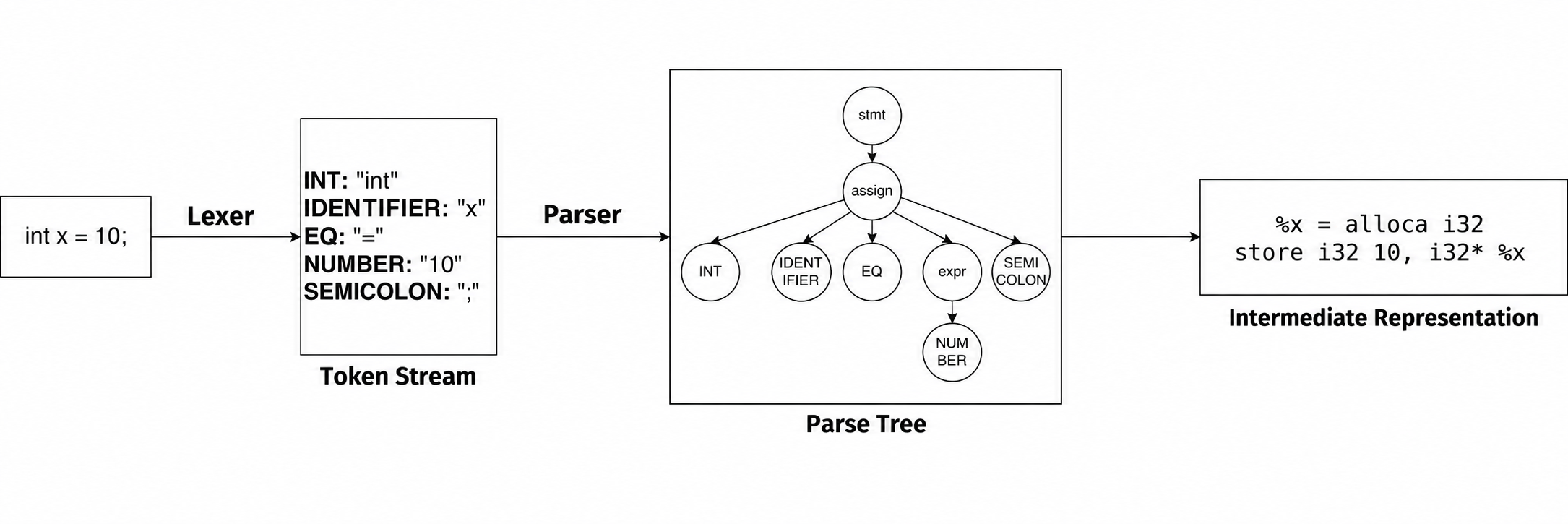
For example, in the diagram below, the code int x = 10; is processed as follows:
intis recognized and classified as anINTtoken (a keyword).xis recognized and classified as anIDENTIFIERtoken (an identifier).- The remaining input is processed in the same way.
The result of lexical analysis is a sequence of tokens called a token stream. For this example, the token types are INT, IDENTIFIER, EQ, NUMBER, and SEMICOLON.
The token stream is then passed to the parser. The parser checks whether it is valid according to predefined syntax rules. If it is valid, the token stream is converted into a parse tree; otherwise, the parser reports a syntax error. In later stages, the front end translates the parse tree into an intermediate representation (IR), which is then passed to the back end.
Building a compiler front end from scratch can be challenging. Fortunately, ANTLR automates much of the process. This week, we will focus on using ANTLR for lexical analysis.
Defining Lexical Rules
As we have seen, a lexer breaks source code into “words” and assigns a “part of speech” to each one. To do this, we need a set of lexical rules that describe what each kind of "word" looks like. These rules are typically defined using regular expressions. The lexer examines the characters in the input string and attempts to match these rules. Once a rule matches, the lexer records the token and continues analyzing the input from the next character. Note that this is a simplified description: the actual matching process can involve more complex operations, such as backtracking and error recovery (for example, discarding invalid characters so that compilation can continue).
Regular Expressions
Regular expressions can be viewed as a formal language for describing string patterns. A string pattern specifies the rules that a string must satisfy.
For example, suppose we want to match a string that begins with one or more lowercase letters, followed by one or more digits. To express this pattern in an ANTLR lexer rule, we use regular expression notation:
Here is a brief explanation:
[]defines a character set and matches any one character in that set.[a-z]represents any lowercase letter fromatoz(equivalent to listing all 26 letters inside the brackets).[0-9]represents any digit from0to9.+is a quantifier that matches the preceding element one or more times (at least once).- Similarly,
*matches the preceding element zero or more times.
Regular expressions are highly expressive. You can find plenty of resources explaining their syntax in the textbook or online, so we will not go into further detail here.
Using Regular Expressions in ANTLR
Do you remember the .g4 file introduced in the previous chapter? This is where you define all your lexical rules, as well as the syntax rules that we will introduce in later chapters.
How do we distinguish lexical rules from syntax rules? In a .g4 file, we use a simple convention: rules whose names begin with an uppercase letter are lexer rules, while rules whose names begin with a lowercase letter are parser rules.
Let us use the Calc1.g4 file from the first chapter as an example:
grammar Calc1;

expr    : expr MUL expr
        | expr DIV expr
        | expr PLUS expr
        | expr MINUS expr
        | factor
        ;

factor  : INT
        | ID
        ;

INT : [0-9]+ ;
PLUS: '+';
MINUS: '-';
MUL: '*';
DIV: '/';
ID : [a-zA-Z]+ ;
WS  : [ \t\r\n]+ -> skip ;
-
The first line,
grammar Calc1;, declares the name of the grammar. ANTLR uses the grammar name to name the generated Java files, such as the lexer and parser files. -
The next few lines, whose rule names begin with lowercase letters, are parser rules (also called productions). We will discuss them in detail in later chapters.
-
The remaining rules, whose names begin with uppercase letters, are our lexer rules. Their basic format is:
Here, the lexer rule name corresponds to the "part of speech" in our earlier analogy. The parser analyzes a sequence of these token types rather than the original text directly.
Among the Java files generated in the previous chapter, Calc1Lexer.java contains the lexer. We can modify our earlier example to inspect the tokens it produces.
import generated.Calc1.Calc1Lexer;
import org.antlr.v4.runtime.CharStream;
import org.antlr.v4.runtime.CharStreams;
import org.antlr.v4.runtime.CommonTokenStream;
import org.antlr.v4.runtime.Token;
import java.util.List;

public class Main {
    public static void main(String[] args) {
        // Create a character stream from a string. To read from a file, use CharStreams.fromFileName("path/to/file").
        CharStream charStream = CharStreams.fromString("1 + 2");
        Calc1Lexer lexer = new Calc1Lexer(charStream);

        // Create a token stream using the lexer instance.
        CommonTokenStream tokens = new CommonTokenStream(lexer);

        // Call fill() to run the lexer and populate the token stream.
        tokens.fill();

        // Print the token stream information.
        for (Token token : tokens.getTokens()) {
            System.out.println(token.toString());
        }
    }
}
Running the program above produces the following output:
Here is what each field in the first line, [@0,0:0='1',<1>,1:0], means:
@0: The token index, starting from 0.0:0: The token's start and stop indices in the entire input string, both inclusive.'1': The actual text matched by the token—the "word" in our analogy.<1>: The token type. Here, type number<1>corresponds toINT. You can find the mapping between token type names and numbers in the.tokensfile generated by ANTLR.1:0: The token's line and column numbers. Note that line numbers start at 1, while column numbers start at 0.
Notice the EOF (End Of File) token at the end. It marks the end of the input and is added automatically by ANTLR; you do not need to define it in your rules.
ANTLR's Default Error Handling
What happens if a substring of our source code cannot be matched by any lexer rule?
For example, suppose our only lexer rule is ADD: '++';, and the input string is +&++. When the lexer reads the first +, it expects the next character to also be +. Instead, it encounters &, so +& cannot match any rule. ANTLR's lexer reports a token recognition error and consumes the character that triggered the error (& in this example). The lexer then resumes matching at the third character in the input (+).
Exercise
Write an ANTLR lexer for IPv4 addresses that recognizes the following three token types:
Dot:.Number: A nonnegative decimal integer consisting of 1–3 digits, with a value no greater than 255. If the input has fewer than three digits, the program must add leading zeros so that the printed value has exactly three digits.ERROR: A digit sequence whose value is greater than 255 or whose length exceeds three digits. Leading zeros count toward the length. Treat the entire run of digits as a singleERRORtoken; do not split it into multipleNumbertokens.
For example, 16 is recognized as Number and printed as 016; 0016 is recognized as ERROR because it has four digits, even though its value is no greater than 255.
To print the tokens you have recognized, you can modify Main.java as follows:
import generated.IPV4.IPV4Lexer;
import org.antlr.v4.runtime.CharStream;
import org.antlr.v4.runtime.CharStreams;
import org.antlr.v4.runtime.CommonTokenStream;
import org.antlr.v4.runtime.Token;

public class Main {
    public static void main(String[] args) {
        CharStream charStream =
                CharStreams.fromString("257.016.299.233");

        IPV4Lexer lexer =
                new IPV4Lexer(charStream);

        CommonTokenStream tokens =
                new CommonTokenStream(lexer);

        tokens.fill();

        for (Token token : tokens.getTokens()) {
            // No EOF
            if (token.getType() == Token.EOF) {
                continue;
            }

            String tokenType =
                    lexer.getVocabulary()
                            .getSymbolicName(token.getType());

            System.out.printf(
                    "TokenType: %s, Lexeme: %s%n",
                    tokenType,
                    token.getText()
            );
        }
    }
}
Sample Input 1
Sample Output 1
TokenType: Number, Lexeme: 010
TokenType: Dot, Lexeme: .
TokenType: Number, Lexeme: 016
TokenType: Dot, Lexeme: .
TokenType: Number, Lexeme: 124
TokenType: Dot, Lexeme: .
TokenType: Number, Lexeme: 233